Implementing an AI Personal Assistant using NanoBot and OpenIM
使用NanoBot和OpenIM实现AI个人助手
目标
- 在
OpenIM(open-im-server)里实现一个“类似飞书/企微的机器人”,并把它作为NanoBot的一个chat channel,使用户在OpenIM客户端里和NanoBot对话、调用工具(比如cron定时提醒)。
实现步骤
使用
docker部署NanoBot服务:1
2
3
4
5
6
7
8
9
10
11
12
13
14
15
16
17
18
19
20
21
22
23
24
25
26
27# Download source code
git clone https://github.com/HKUDS/nanobot.git
# Build the image
docker build -t nanobot .
# Initialize config (first time only)
docker run -v ~/.nanobot:/root/.nanobot --rm nanobot onboard
# Edit config on host to add API keys(如:providers.minimax.apiKey, providers.minimax.apiBase) and model(agents.default.model)
vim ~/.nanobot/config.json
# Run gateway
docker run -d --name nanobot \
--restart unless-stopped \
-v ~/.nanobot:/root/.nanobot \
-v /etc/localtime:/etc/localtime:ro \
-v /etc/timezone:/etc/timezone:ro \
-e TZ=Asia/Shanghai \
-p 18790:18790 \
-p 19000:19000 \
nanobot gateway
# Or run a single command
docker exec -it nanobot /bin/bash
nanobot agent -m "Hello!"
nanobot status使用
docker-compose部署OpenIM服务:1
2
3
4
5
6
7
8
9
10
11
12
13
14
15
16
17# Download source code
git clone https://github.com/openimsdk/openim-docker
# Set up MinIO address
vim openim-docker/.env
MINIO_EXTERNAL_ADDRESS="http://external_ip:10005"
# Uncomment the openim-admin-front service in docker-compose if it is commented out.
# vim openim-docker/docker-compose.yaml
# Start services
docker compose up -d
# Quick verification
# If you see the OpenIM login page, it means OpenIM is running successfully.
curl http://your_server_ip:11001
curl http://your_server_ip:11002使用默认管理员账号(
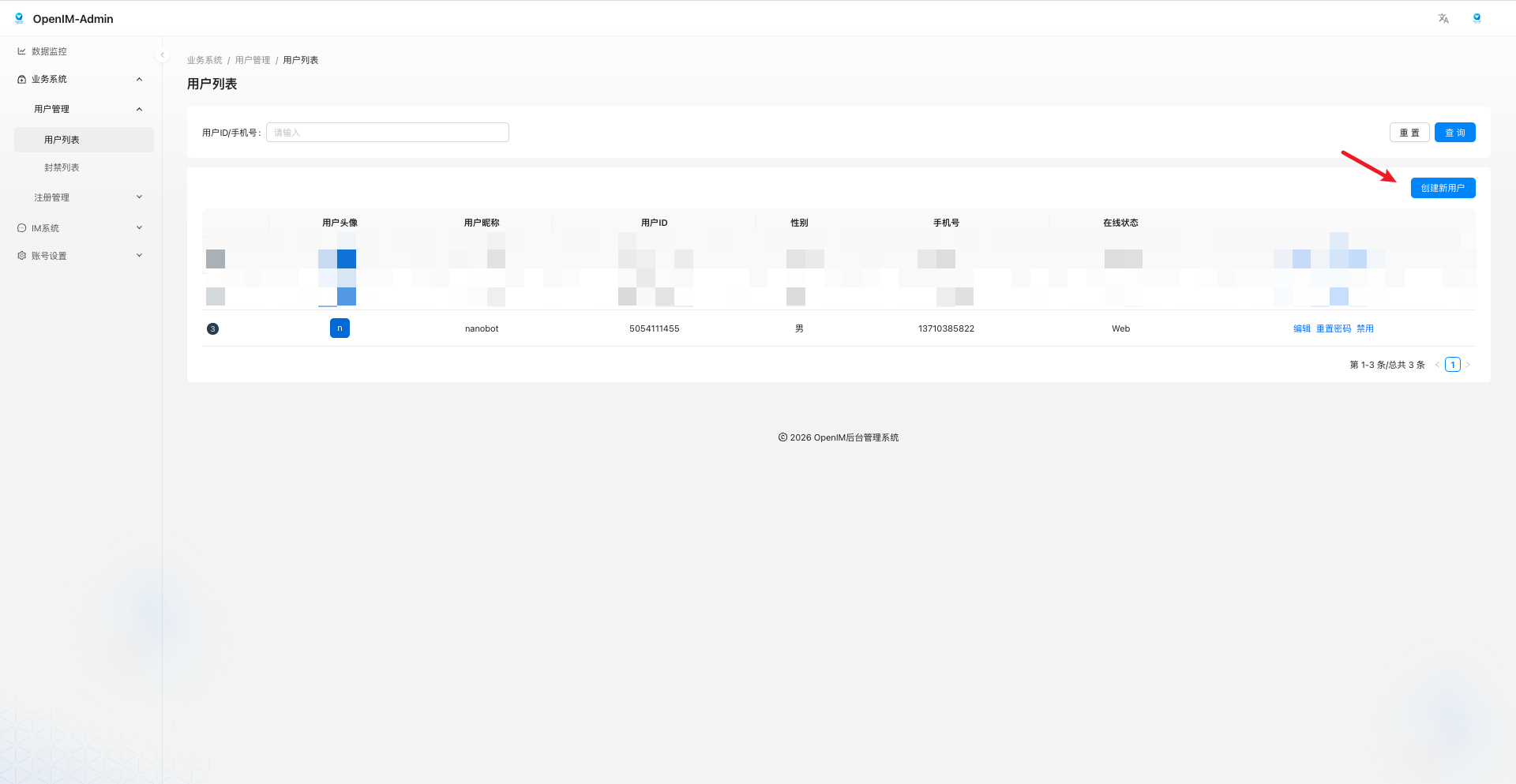
chatAdmin/chatAdmin)登录OpenIM后台管理(http://your_server_ip:11002),创建机器人账号,记录机器人用户ID:
开启
WebHooks回调:将容器里的
webhooks.yml拷贝到宿主机:1
2
3
4mkdir -p ./openim-config
CID=$(docker compose ps -q openim-server)
docker cp "$CID:/openim-server/config/webhooks.yml" ./openim-config/webhooks.yml编辑
webhooks.yml文件,设置回调地址,启用单聊并添加机器人用户ID:1
2
3
4
5
6
7url: "http://nanobot_ip:9000"
afterSendSingleMsg:
enable: true
timeout: 5
failedContinue: true
attentionIds: ["<BOT_USER_ID>"]修改
docker-compose.yaml文件,挂载webhooks.yml文件到openim-server容器:1
2
3
4services:
openim-server:
volumes:
- ./openim-config/webhooks.yml:/openim-server/config/webhooks.yml:ro
添加
NanoBot机器人为管理员:将容器里的
share.yml拷贝到宿主机:1
2
3
4mkdir -p ./openim-config
CID=$(docker compose ps -q openim-server)
docker cp "$CID:/openim-server/config/share.yml" ./openim-config/share.yml编辑
share.yml文件,设置回调地址,添加机器人用户ID为管理员:1
2
3imAdminUserID:
- imAdmin
- "<BOT_USER_ID>"修改
docker-compose.yaml文件,挂载share.yml文件到openim-server容器:1
2
3
4services:
openim-server:
volumes:
- ./openim-config/share.yml:/openim-server/config/share.yml:ro重启
openim-server容器:1
docker compose up -d --force-recreate openim-server
实现
OpenIM Channel:在
.nanobot/config.json文件里新增opemim channel配置:1
2
3
4
5
6
7
8
9
10
11
12
13
14
15
16
17{
"channels": {
"openim": {
"enabled": true,
"apiAddress": "http://openim-server_ip:10002",
"adminUserId": "<ADMIN_USER_ID>", # 在openim-server的share.yml的imAdminUserID中配置,默认为imAdmin
"adminSecret": "<ADMIN_SECRET>", # 在openim-server的share.yml的secret中配置,默认为openIM123
"botUserId": "<BOT_USER_ID>",
"botNickname": "NanoBot",
"botPlatformId": 1,
"listenHost": "0.0.0.0",
"listenPort": 19000,
"webhookPath": "/callbackAfterSendSingleMsgCommand",
"enableReadReceipt": true
}
}
}在
nanobot/config/schema.py文件里新增openim channel配置定义:1
2
3
4
5
6
7
8
9
10
11
12
13
14
15
16
17
18
19
20
21
22
23
24
25
26
27class OpenIMConfig(BaseModel):
"""OpenIM channel configuration using webhook + REST API."""
enabled: bool = False
# OpenIM REST API address, e.g. http://openim-api:10002
api_address: str = "http://127.0.0.1:10002"
# Admin credential (used to get admin token, then mint bot user token)
admin_user_id: str = "imAdmin"
admin_secret: str = "openIM123"
# Bot identity in OpenIM
bot_user_id: str = ""
bot_nickname: str = "NanoBot"
bot_platform_id: int = 1 # keep consistent with your OpenIM client platformID usage
# Webhook server listen (OpenIM server will POST here)
listen_host: str = "0.0.0.0"
listen_port: int = 19000
webhook_path: str = "/callbackAfterSendSingleMsgCommand"
# Read receipt / unread fix
enable_read_receipt: bool = True
class ChannelsConfig(BaseModel):
# ...
openim: OpenIMConfig = Field(default_factory=OpenIMConfig)在
nanobot/channels/manager.py文件里新增openim channel注册:1
2
3
4
5
6
7
8
9
10def _init_channels(self) -> None:
# ...
# OpenIM channel
if self.config.channels.openim.enabled:
try:
from nanobot.channels.openim import OpenIMChannel
self.channels["openim"] = OpenIMChannel(self.config.channels.openim, self.bus)
logger.info("OpenIM channel enabled")
except ImportError as e:
logger.warning("OpenIM channel not available: {}", e)新增
nanobot/channels/openim.py文件,实现OpenIM channel逻辑:负责 ```token``` 和 ```send/read API``` 调用 1
2
3
4
5
6
7
8
9
10
11
12
13
14
15
16
17
18
19
20
21
22
23
  ```OpenIMChannel``` 负责启动 ```webhook server```,接收消息并转发到 ```bus```;收到 ```agent``` 输出后发送回复

  具体实现参考[这里](https://github.com/Garden12138/notes/tree/master/ai/code/Implementing%20an%20AI%20Personal%20Assistant%20using%20NanoBot%20and%20OpenIM/openim.py)

* 修改(覆盖) [```nanobot/agent/loop.py```](https://github.com/Garden12138/notes/tree/master/ai/code/Implementing%20an%20AI%20Personal%20Assistant%20using%20NanoBot%20and%20OpenIM/loop.py)、 [```nanobot/cron/service.py``](https://github.com/Garden12138/notes/tree/master/ai/code/Implementing%20an%20AI%20Personal%20Assistant%20using%20NanoBot%20and%20OpenIM/service.py)、[```nanobot/agent/tools/cron.py```](https://github.com/Garden12138/notes/tree/master/ai/code/Implementing%20an%20AI%20Personal%20Assistant%20using%20NanoBot%20and%20OpenIM/cron.py) 以及 [```nanobot/cli/commands.py```](https://github.com/Garden12138/notes/tree/master/ai/code/Implementing%20an%20AI%20Personal%20Assistant%20using%20NanoBot%20and%20OpenIM/commands.py) 文件,使其可以正常回复 ```openim channel``` 的消息。

* 修改 ```Dockerfile```,加速构建以及暴露```webhook server 19000```端口,可参考[这里](https://github.com/Garden12138/notes/tree/master/ai/code/Implementing%20an%20AI%20Personal%20Assistant%20using%20NanoBot%20and%20OpenIM/Dockerfile)

* 暂停并删除 ```NanoBot``` 容器,删除 ```NanoBot```旧镜像,重新构建镜像,再启动:

  ```bash
  docker stop nanobot && docker rm nanobot && docker rmi nanobot
  docker build -t nanobot .
  docker run -d --name nanobot \
    --restart unless-stopped \
    -v ~/.nanobot:/root/.nanobot \
    -v /etc/localtime:/etc/localtime:ro \
    -v /etc/timezone:/etc/timezone:ro \
    -e TZ=Asia/Shanghai \
    -p 18790:18790 \
    -p 19000:19000 \
    nanobot gateway
验证功能,登录
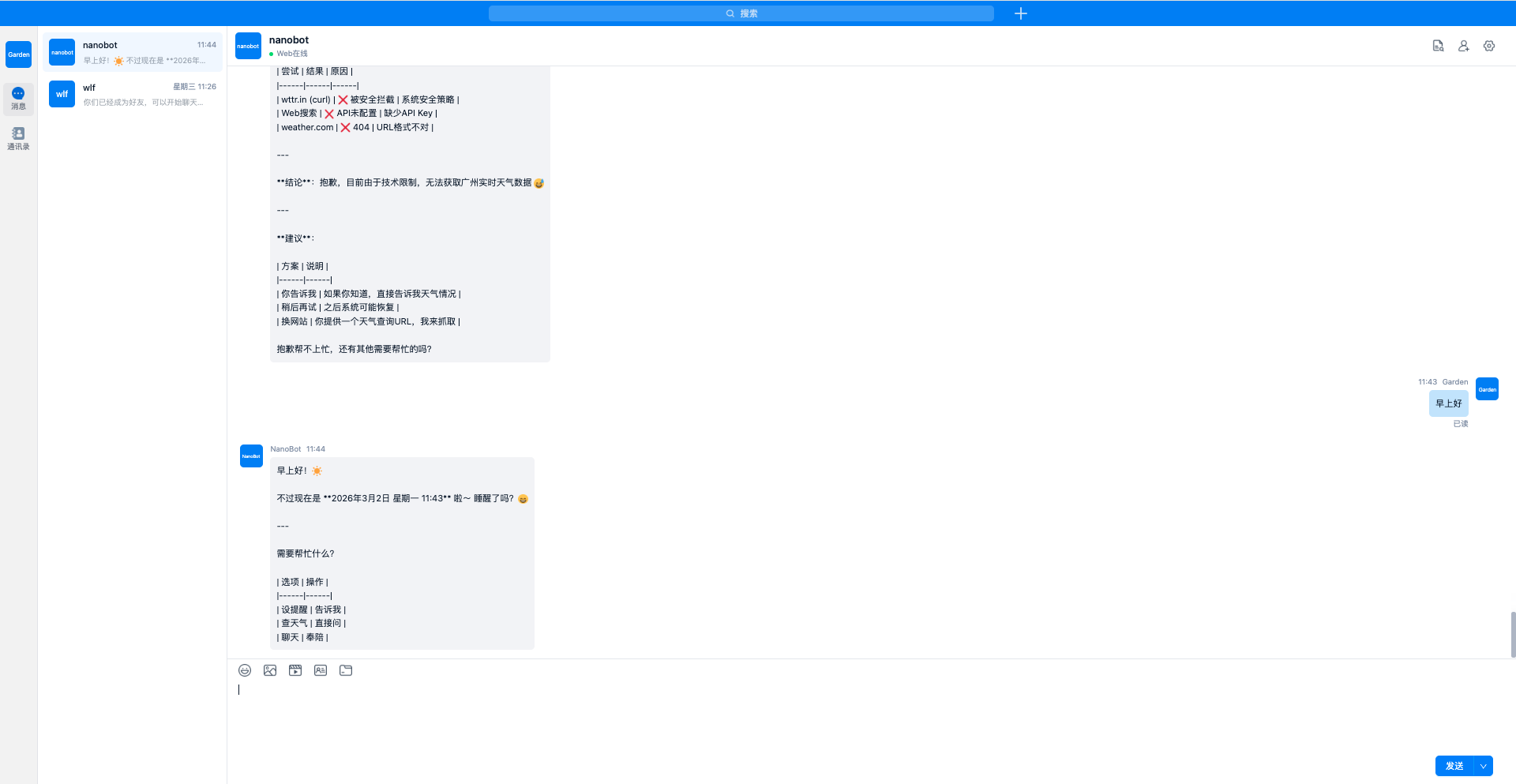
OpenIM客户端,添加机器人为好友,发送消息给机器人,机器人回复消息:

参考文献
本博客所有文章除特别声明外,均采用 CC BY-NC-SA 4.0 许可协议。转载请注明来源 后端学习手记!
相关推荐

2025-11-03
AI video face-swapping implementation methods.md
调研基于 Wan2.2-Animate 的视频换脸实现方式,覆盖 HuggingFace、ModelScope、Wan 平台、ComfyUI(在线/本地)流程、优缺点与关键模型配置。

2025-10-15
BPE algorithm analysis
深入解析BPE(Byte Pair Encoding)算法的工作原理,包括训练流程和应用流程,通过迭代合并高频字符对来构建词汇表,有效解决NLP中的罕见词问题。

2025-10-16
Business license OCR implementation
基于FastAPI框架实现营业执照OCR识别系统,集成读光票证检测矫正模型和Nanonets-OCR-s模型,自动识别营业执照中的统一社会信用代码、名称、法定代表人、住所等关键信息。

2025-06-30
DB-GPT usage
DB-GPT是一个开源的AI原生数据应用开发框架,目的是构建大模型领域的基础设施,通过开发多模型管理(SMMF)、Text2SQL效果优化、RAG框架以及优化、Multi-Agents框架协作、AWEL(智能体工作流编排)等多种技术能力,让围绕数据库构建大模型应用更简单,更方便。

2026-01-29
Deploying Step3-VL-10B using vLLM multi-GPU inference
介绍在 Ubuntu 22.04 + 多张 22GB GPU 服务器上,通过 vLLM OpenAI API Server 部署 Step3-VL-10B 模型的完整流程,包括 NVIDIA 驱动与 CUDA 配置、Docker GPU 环境搭建、ModelScope 模型缓存、vLLM 多卡 Tensor Parallel 启动参数以及接入 dify 工作流的实战案例。

2025-07-15
Download model
下载模型,使开发者可在本地环境微调或运行推理模型。


